The Skills Hub is designed to support your academic and personal development. A really good place to start We've put together a list of FAQ’s based on queries we have received from students and staff. Hopefully this page will guide you with any specific queries you may have about using the Skills Hub. However, if you cannot find the answer you are looking for, or need help with study skills or accessing library support, please feel free to message us via the Contact Us page.
Do I need to be a University of Greater Manchester student to access the Skills Hub?
No! The the Skills Hub website and associated content is open for all to access but you will need a University of Greater Manchester username and password to earn a digital badge.
How is the Skills Hub website organised?
The the Skills Hub website is organised into the following categories:
- Mandatory, Required, and Recommended
- Librarian and Academic Skills
- Academic Integrity
- Artificial Intelligence
- Digital Skills
- Wellbeing
- Careers and Employability
How do I earn Skills Hub digital badges?
Every the Skills Hub section contains a button to access an assessment where you can earn a digital badge for that particular section. Skills Hub digital badges are hosted in Moodle and can only be accessed by users with a University of Bolton username and password.
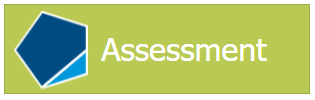
To earn a digital badge, select the green 'Assessment' button (pictured below) within the the Skills Hub section page. You will be prompted to login to Moodle and then automatically directed to the specific Moodle quiz for the Skills Hub section and level. You must attain a passing score to earn your digital badge.
Why do the Skills Hub digital badges show (xxx Ed.) in their name?
Most Skills Hub digital badges show an editon indicator, for example, 2nd Ed. or 3rd Ed. in their name to indicate the current badge version (or edition as we call it), it does not indicate the level of the badge. When we update a LEAP Online section the badged assessment may also be updated and recieve a new edition number.
The level of a digital badge is indicated in the badge name, for example:
- Discovering Information - Level 1 (2nd Ed.)
- Discovering Information - Level 2 (2nd Ed.)
- Discovering Information - Level 3 (2nd Ed.)
How can I view my Skills Hub digital badge collection?
Each time you earn a Skills Hub digital badge it will become associated with your Moodle account and stored within your Moodle profile. To view your digital badge collection, log in to Moodle and access your Moodle profile page. Visit the link below for guidance on how to access your Moodle profile page and view your digital badge collection:
Do I need to earn every Skills Hub digital badge?
You are free to explore LEAP Online and visit the sections that interest you the most and are relevant to your studies. In some subject areas tutors may ask or direct you to complete a specific set of Skills Hub sections and evidence your learning by collecting the digital badges.
Why do my Skills Hub Moodle courses not show 100% complete?
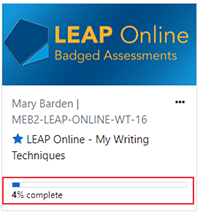
When you attempt a Skills Hub digital badge for the first time you will be automatically enrolled on to a Moodle course containing multiple badged assessments relevant to other sections within the Skills Hub. As you may only choose to complete a selection of digital badges across the Skills Hub, the activity completion percentage shown on your Moodle Dashboard page may never indicate 100% complete (pictured below). This is perfectly ok!
How do I access the Skills Hub activities?
The majority of Skills Hub sections contain an activity. To access an activity, select the blue 'Activity' button (pictured below) within the Skills Hub section page. Activities open in a pop up window which can be resized and you will need to allow pop ups in your browser. Visit the links below for guidance on how to enable pop ups in your browser:

Tutorial accessibility
We’ve built the Skills Hub Tutorial to be as easy to use as possible. You can use the Read Aloud feature in Microsoft Edge to listen to the content on each page, and all our videos have transcripts available through the Closed Captions button [CC] within the video player. If you’d like a printed version, you can print individual pages. But before you do, please think about whether you really need to print — going digital is often the more sustainable choice for the environment.
Are there any face to face or online workshop sessions I can attend at the University?
If you are enrolled at the University you can attend any of the sessions run by the Library, Careers or other departments. Have a look at the Librarian and Academic Skills page to see of any sessions that are currently running. Check back regularly for new workshops added.
Is the Skills Hub available in an accessible format?
The University would like as many students as possible to be able to use the Skills Hub and we are continually aspiring to improve accessibility to our award-winning online skills portal. To facilitate your learning experience, we aim to provide all students with the technological means to enhance their experience and overcome any barriers to learning. Therefore, the University employ advanced website accessibility solutions that offer students a variety of ways in which to learn that reflects their individuality.
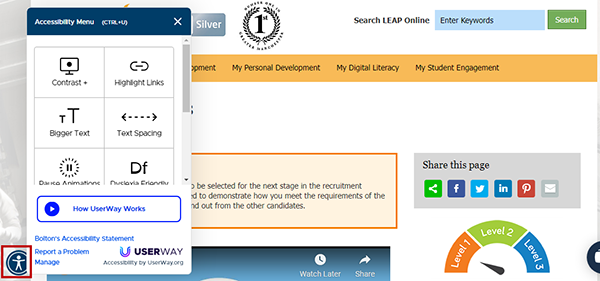
By clicking on the 'User Way' symbol (icon of a figure standing with outstretched arms), which can be found at the bottom left-hand side of every Skills Hub section, you can differentiate Skills Hub webpages to meet your individual needs. If, however, you would like any of the Skills Hub resources in an alternative format, please contact the Skills Hub Team, who will be more than happy to assist you further.
Why is the Career Passport linked to some Skills Hub sections?
The Career Passport is UGMs employability programme designed to help you build real skills, gain experience, and feel confident about your future. By completing Skills Hub sections linked to the Career Passport, you’ll not only develop key academic and professional skills, but also earn either 5 or 10 Career Passport points for each Skills Hub Online section completed, helping you work towards stamps and recognition for your employability development.
Look for the above banner displayed below the GAME attributes to indicate teh Skills Hub sections linked to the Career Passport.